
Digital Accessibility
VarnerMiller helps organizations create accessible digital experiences through Section 508 testing, remediation, and accessibility consulting. We identify barriers, improve usability, and support accessibility compliance.
Accessibility Expertise You Can Trust
Our team of DHS Trusted Testers and CPACC-certified accessibility professionals brings specialized expertise in Section 508 and digital accessibility. We help organizations create inclusive content that works for everyone.
Testing & Remediation
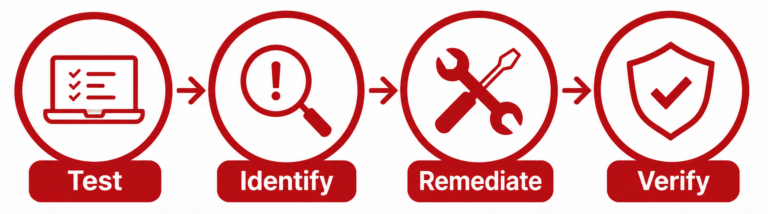
Our accessibility specialists combine automated testing tools with comprehensive manual testing to identify barriers that technology alone may not detect. We evaluate digital content against Section 508 and applicable accessibility standards, remediate identified issues, and retest to verify accessibility and usability.
Automated Accessibility Testing
We use industry-standard tools to identify potential accessibility issues across websites, applications, documents, and digital content.
Manual Accessibility Testing
Our specialists manually evaluate keyboard access, focus order, content structure, forms, and interactions to identify barriers automated tools may miss.
Assistive Technology Testing
We test digital experiences with assistive technologies, including screen readers, to evaluate accessibility and usability.
Remediation & Verification
We remediate identified issues and retest content to verify that accessibility barriers have been addressed.
What We Can Remediate
From individual documents to complex digital experiences, we remediate accessibility barriers across a wide range of content and platforms.
Accessible Learning
We test and remediate eLearning, training materials, multimedia, and instructional content to help ensure learners with disabilities can access and engage with learning experiences.
Accessibility Training & Support
We help build accessibility knowledge across your organization. VarnerMiller provides accessibility training for stakeholders, content creators, developers, and other team members to help them understand accessibility requirements and incorporate best practices into their work.
Tools That Support Our Testing
We use industry-standard accessibility tools and assistive technologies to support automated, manual, and document accessibility testing.
Automated & Manual Testing
axe DevTools
ANDI
WAVE
Colour Contrast Analyser
Keyboard Navigation
Assistive Technology
NVDA
JAWS
Windows Magnifier
Document Accessibility
Adobe Acrobat Pro
PAC
Microsoft Accessibility Checker
CommonLook PDF
Callas pdfGoHTML (tables)
From Testing Through Remediation
We support the full accessibility lifecycle—from identifying barriers through remediation and verification.
Let’s Make Digital Content Accessible
Whether you need accessible digital content created from the start, Section 508 testing and remediation, or accessibility training for your team, our specialists are ready to help.